Skills
Download packaged QC Database skills and install them where you need them.
Available downloads
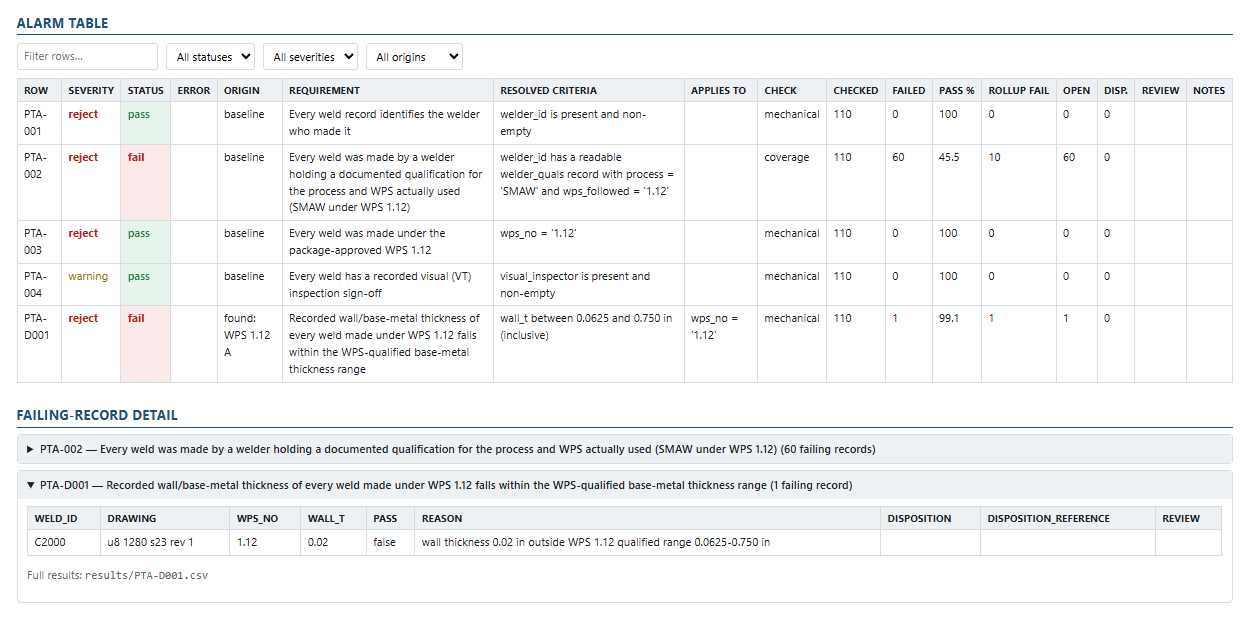
alarm-tables
A rules-based auditing engine for construction QC documentation, built for contractors who need their documentation complete and conformant before it gets audited. Point it at a turnover package, a weld log, or welder quals (data from the QC Database MCP server, CSV exports, anywhere) and it produces an actionable punch list, a delta against the last run, and a formal, self-contained audit report. All auditing intelligence lives in baseline alarm tables you author per audit domain, plus dynamic requirements the AI agent discovers from the package's own documents.
- Maximum audit trail: every verdict records its inputs (sha256 manifest, engine and baseline hashes, the model and prompt behind every AI judgment, verbatim evidence, every human decision). Deltas are computed, never destructive.
- No silent judgment calls: conflicting requirements report both sides; unfindable references, unit mismatches, and revision drift each alarm with their own error type.
- Dispositions instead of mute buttons: standing failures get accepted-deviation dispositions with an NCR/waiver reference, and AI verdicts get human review overrides that go stale and re-judge when conditions change.
- Compiled audit packs: mechanical checks compile to reviewable, hand-tunable SQL (DuckDB) for deterministic, cheap re-runs. An executable ITP.
- Industry-fit deliverables: punch lists as CSV, the audit record as flat JSON (Power BI-ready), and a single self-contained HTML Standard Alarm Table Report you can print to PDF.
Install: load alarm_tables.skill into Claude Code / Agent SDK. Dependencies: duckdb, pyyaml, jsonschema (Python 3.10+).
GitHub: github.com/ProcessQualitySolutions/alarm_table_skill (MIT license)
Developed by the qcdatabase.ai team. Works well with QCDatabase.AI, no membership required.
drawing-rev-diff
Compare two revisions of a construction drawing PDF and see exactly what changed. One command renders both revisions, pixel-diffs them into ranked changed-region rectangles, and writes a throwaway self-contained HTML overlay viewer alongside a structured change report and a plain-text summary. Built for revision reviews, redline checks, and as-built verification on weld maps, isometrics, and vessel drawings.
- Light-table overlay viewer: rev A tinted red and rev B tinted blue over a multiply blend, so shared linework goes dark and every change keeps its revision's color.
- Layer tools: per-layer visibility and opacity sliders, tint toggle, flicker/blink mode (spacebar), side-by-side and difference views, wheel zoom and drag pan.
- Ranked change list: 8-connected hot tiles merge into severity-ranked regions; click one to zoom to it and pulse its outline.
- Auditable report:
diff.json(schemarevdiff/1) with region coordinates in display pixels, plussummary.txtfor quick reading; byte-identical files short-circuit to a clean no-change result. - Pure Python detection: tile-based grayscale diff over pymupdf rasters, no numpy or Pillow; tunable DPI, tile size, and threshold for noisy scans.
Install: load drawing_rev_diff.skill into Claude Code / Agent SDK. Dependencies: pymupdf (Python 3.10+).
GitHub: github.com/ProcessQualitySolutions/drawing_rev_diff (MIT license)
Developed by the qcdatabase.ai team. Works well with QCDatabase.AI, no membership required.
form-fill-assistant
Guardrails for AI-assisted paperwork. Turns the agent into a conscientious form-filling partner for workers dictating or typing reports: instead of blindly completing a form, the agent checks recent history, guides the user through required and optional fields, protects data quality, and makes pencil-whipping tedious enough to discourage. Pure agent behavior plus one stdlib helper script for session state, comparison tables, and save/resume.
- Fetches the last 3 submissions before filling anything and infers whether the new form is an accidental repeat
- Blocks uploads with missing required fields (user can force) and lightly probes once for optional fields
- Remembers standing answers like "always skip field X" in project memory or an instructions file
- Holds each entry to the data quality of the form's own history (prefer "A106" over "Carbon Steel" in a grade field)
- "Just copy the last form" triggers a full read-back of every field with explicit typed or verbal approval required
- Bundled
form_session.py(stdlib only) keeps previous forms and the draft in one JSON dict, renders side-by-side markdown or HTML comparison tables, and saves/resumes a partial fill without re-fetching
Install: load form_fill_assistant.skill into Claude Code / Agent SDK.
No dependencies. Ideal with QCDatabase.AI custom forms (MCP server) or the
Forms module of Autodesk Forma (via MCP), and works with any form system,
including a folder of fillable PDFs.
GitHub: github.com/ProcessQualitySolutions/form_fill_assistant - MIT license
Developed by the qcdatabase.ai team. Works well with QCDatabase.AI, no membership required.
inches-calculator
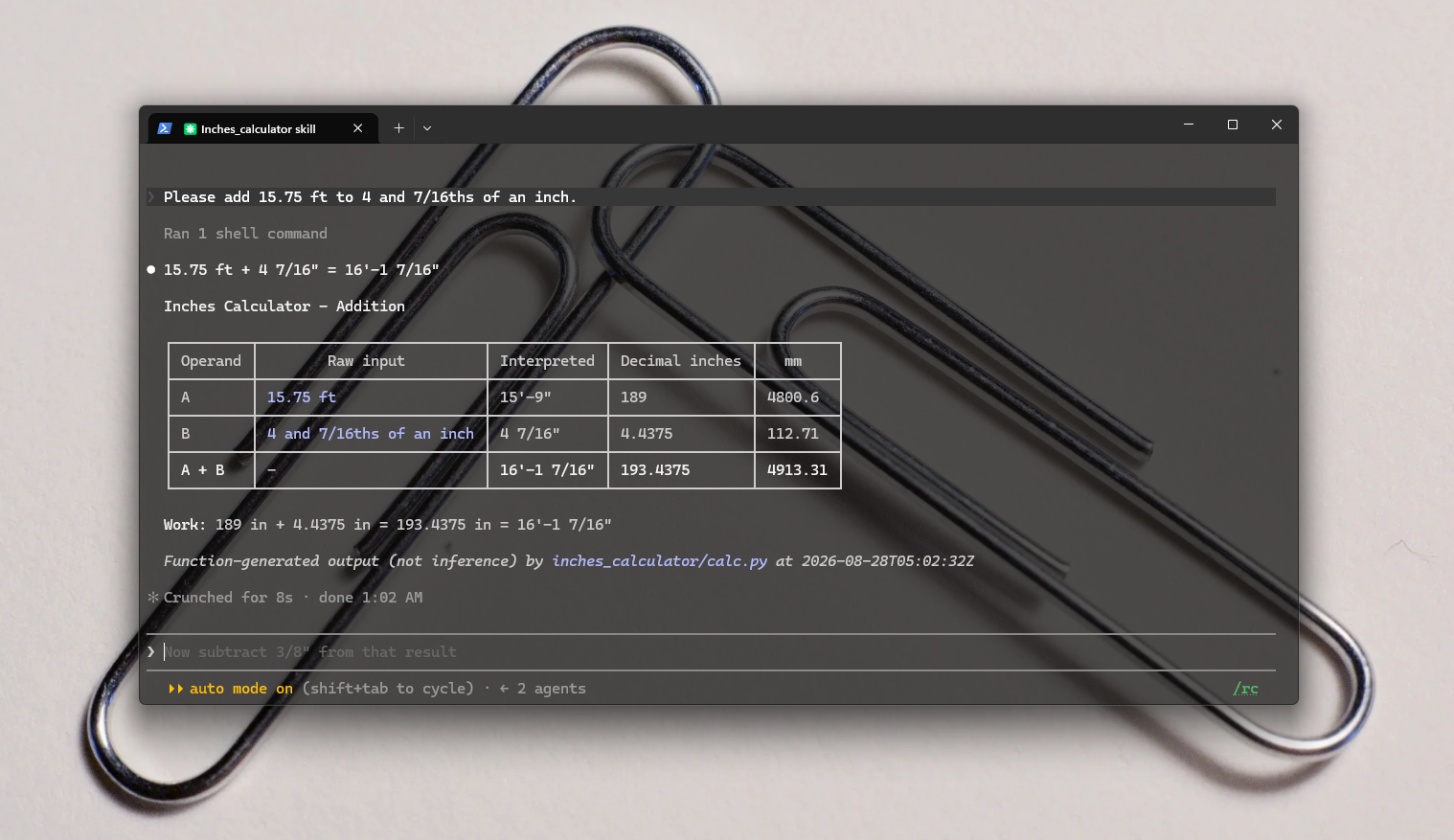
An AI-agent skill (Claude Code / Agent SDK) that turns chaotic imperial dimension input, exactly as a tradesperson types it (1'-6 1/4", 1ft 6-1/4in, 2 6 1 4, -0 1/2, 0.125, 3mm), into a standard measurement dict, and adds or subtracts two dimensions in a single one-shot command. A Python port of the inchesjs library, built so the agent never has to ask "did you mean...?": the parser does the cleanup, and every answer ships with a deterministic work report.
- One inference, one command: both operands go into a single
calc.py add/subcall; no clarification round trips, no agent math. - Chaotic input handled: feet/inch/fraction strings in a dozen sloppy formats, decimals, negatives, and metric (
mm/cm/m), mixed freely across operands. - Deterministic work report: every result object includes a markdown (or HTML) block showing the raw input, the cleaned-up interpretation, decimal inches, millimetres, and the arithmetic performed.
- Faithful to the original: lengths stored as feet + inches + 2048ths, matching inchesjs output value for value; verified against the JS library.
- Zero dependencies: pure Python standard library, importable (
calculate()) or CLI.
Install: load inches_calculator.skill into Claude Code / Agent SDK. No dependencies (Python stdlib only).
GitHub: github.com/ProcessQualitySolutions/inchesjs (MIT license)
Developed by the qcdatabase.ai team. Works well with QCDatabase.AI, no membership required.
pcf2isometric
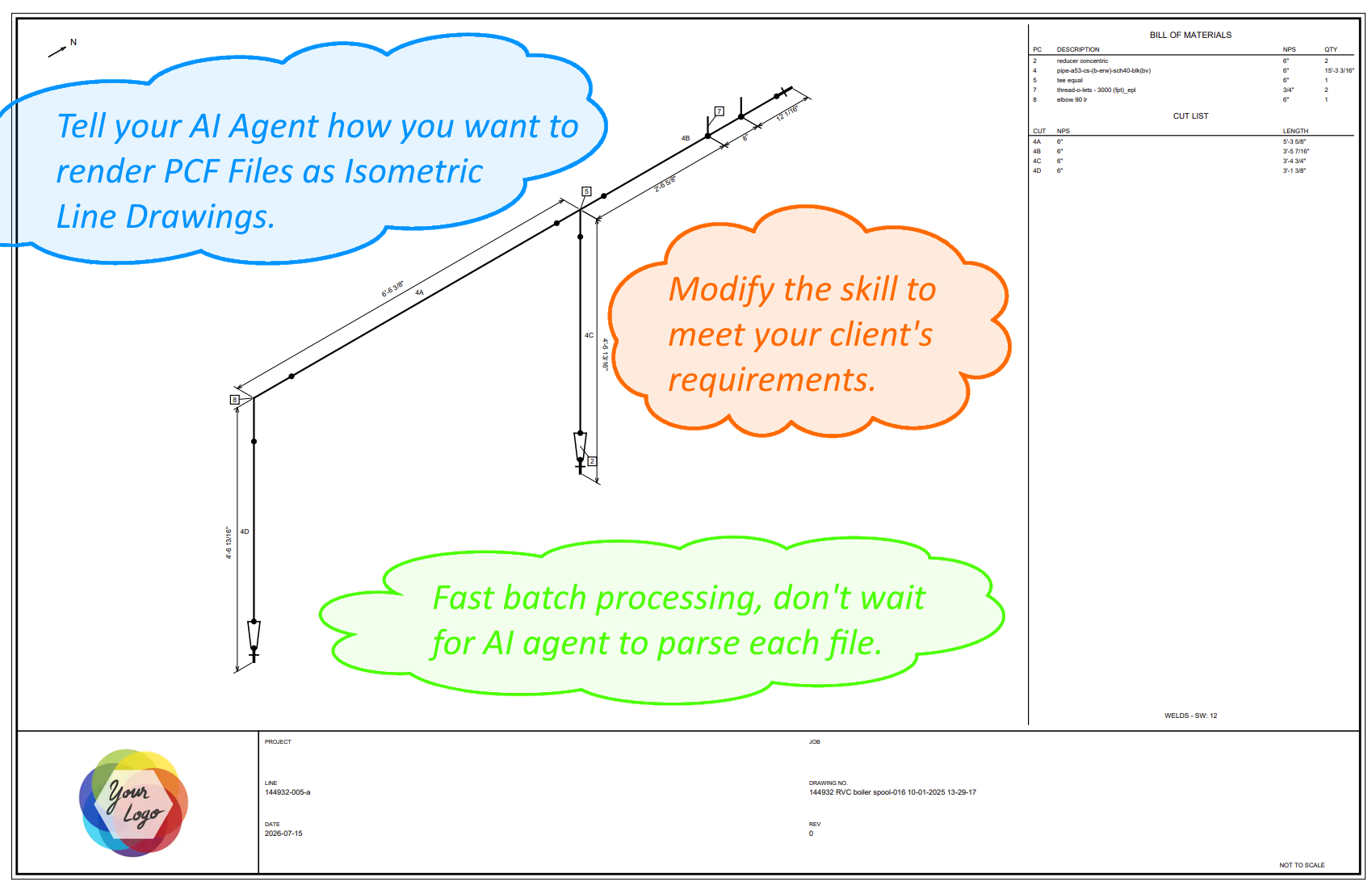
Pipe spool manipulation and isometric rendering for the pipe fabrication industry: parse, inspect, split, merge, and render Piping Component Files (PCF), the spool exchange format produced by Plant 3D, Revit exporters, and Isogen-class systems, into single-line isometric PDF drawings. Built as a rules-based replacement for the abandoned Bentley/Alias Isogen rendering pipeline: deterministic Python geometry instead of an enterprise license, with an AI agent driving the workflow.
- Deterministic cut lengths: END-POINT arithmetic with explicit weld gap accounting, PCF overrides, and branch/olet positions along each piece.
- Split and merge: split a PCF into sheets by separation distance or at any weld or coordinate; merge PCFs with materials reconciliation and adjacency warnings.
- Isometric PDF rendering: true-isometric projection, per-type fitting symbols, dimensional callouts, BOM, cut list, weld dots, company logo, and CSV dumps for tracking systems.
- Weld capture: every weld's number, type, joint, NPS, and page position captured during the render pass and written to CSV, ready for weld-map upload to QC systems.
- Source auditing: snapshots CAD exports read-only into the workspace and diffs against re-exports; the parser round-trips byte-identically (verified against 752 production PCF exports).
Install: load pcf2isometric.skill into Claude Code / Agent SDK. Optional dependency: fpdf2 (PDF rendering only).
GitHub: github.com/ProcessQualitySolutions/pcf2iso (MIT license)
Developed by the qcdatabase.ai team. Works well with QCDatabase.AI, no membership required.
qcdatabase-extract-agent-review
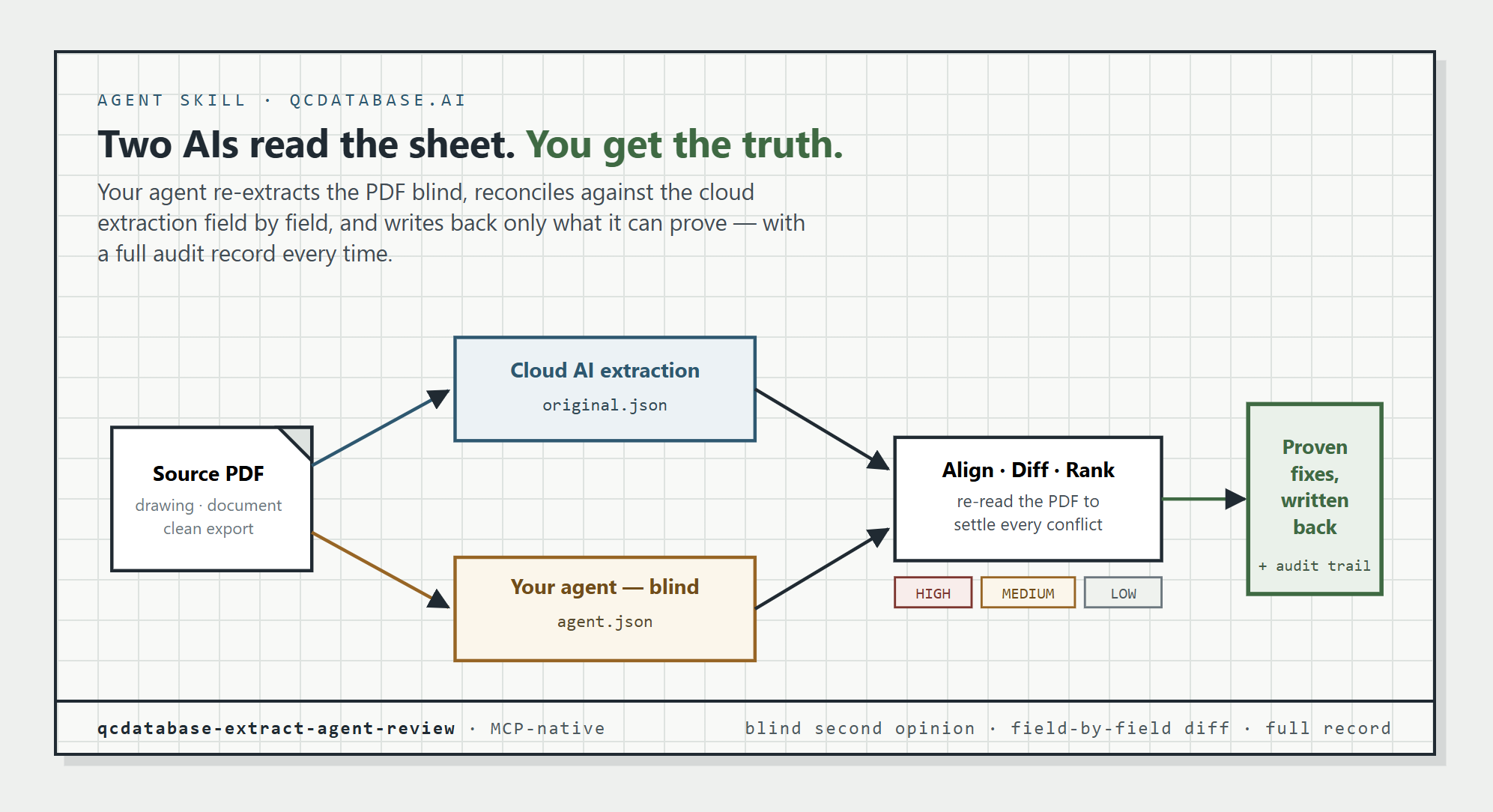
An AI-agent skill (Claude Code / Agent SDK) that audits QC Database's cloud AI document and drawing extraction with a second, independent extraction performed by the agent itself. It pulls the extraction schema, the record's existing AI-extracted JSON, and the source PDF over the QCDatabase.AI MCP server, extracts blind from the PDF, aligns and diffs the two JSON objects, ranks every difference by severity, re-reads the PDF for context on each real conflict, and writes verified corrections back (or presents them for approval in manual mode). Best run on a different model than the one doing cloud extraction, so each AI covers the other's blind spots.
- Blind second extraction: the agent extracts from the clean PDF before reading the cloud result, so the comparison is genuinely independent.
- Noise-free diffing: a bundled stdlib-only script re-orders the agent's JSON to match the original (keys and identifier-matched arrays), then pre-classifies dash/quote/case/word-order differences as low severity so only real conflicts need judgment.
- Evidence-based resolution: every medium/high conflict is checked against context elsewhere on the sheet (notes, BOM, title block) before anything is changed.
- Safe write-back: corrections go back via the MCP server (
set_document_extracted_data), gated by your permission settings or an explicit manual-approval mode. - Full audit trail: every review saves the PDF, both extractions, the ranked diff, the final JSON, a markdown summary, and a running JSONL log to your project folder.
Install: load qcdatabase_extract_agent_review.skill into Claude Code / Agent SDK. No pip dependencies; requires the QCDatabase.AI MCP server connection.
GitHub: github.com/ProcessQualitySolutions/qcdatabase_extract_agent_review (MIT license)
Developed by the qcdatabase.ai team. Works well with QCDatabase.AI, no membership required.
weld-analytics
Turn weld production and QC records into a filterable, self-contained HTML analytics dashboard plus flat CSV/JSON exports. Covers everything the welder-lots skill's statistical NDE lot acceptance does not: per-welder fail and repair rates, per-project and corporate-level repair statistics, productivity and welds-per-day trends, first-pass yield, breakdowns, NDE backlog aging, and data quality. Feed it welder-lots-style JSON or weld log / NDE report CSVs (data from the QC Database MCP server, exports, anywhere); several files roll up into corporate views.
- One-file dashboard: KPIs, weekly trend charts, a sortable welder leaderboard with sparklines, project comparison, breakdowns by WPS/joint/size/shop-vs-field/NDE type, an aging table, and a data-quality panel, all in a single HTML file that opens anywhere and prints to PDF.
- Client-side filtering: project, welder, date range, joint, location, WPS, NDE type, and size filters recompute every chart, table, and KPI instantly with no server.
- Auditable numbers: every metric is defined once in
references/metrics_spec.md, every rate carries its numerator/denominator, and small slices suppress to n<10 instead of showing misleading rates. - Flat exports:
welds.csv,welder_summary.csv,project_summary.csv, anddata.jsonfor spreadsheets and BI tools. - Zero dependencies: pure Python standard library, hand-rolled inline SVG charts, no chart libraries.
Install: load weld_analytics.skill into Claude Code / Agent SDK. Dependencies: none (Python 3.10+).
GitHub: github.com/ProcessQualitySolutions/weld_analytics_skill (MIT license)
Developed by the qcdatabase.ai team. Works well with QCDatabase.AI, no membership required.
weldb
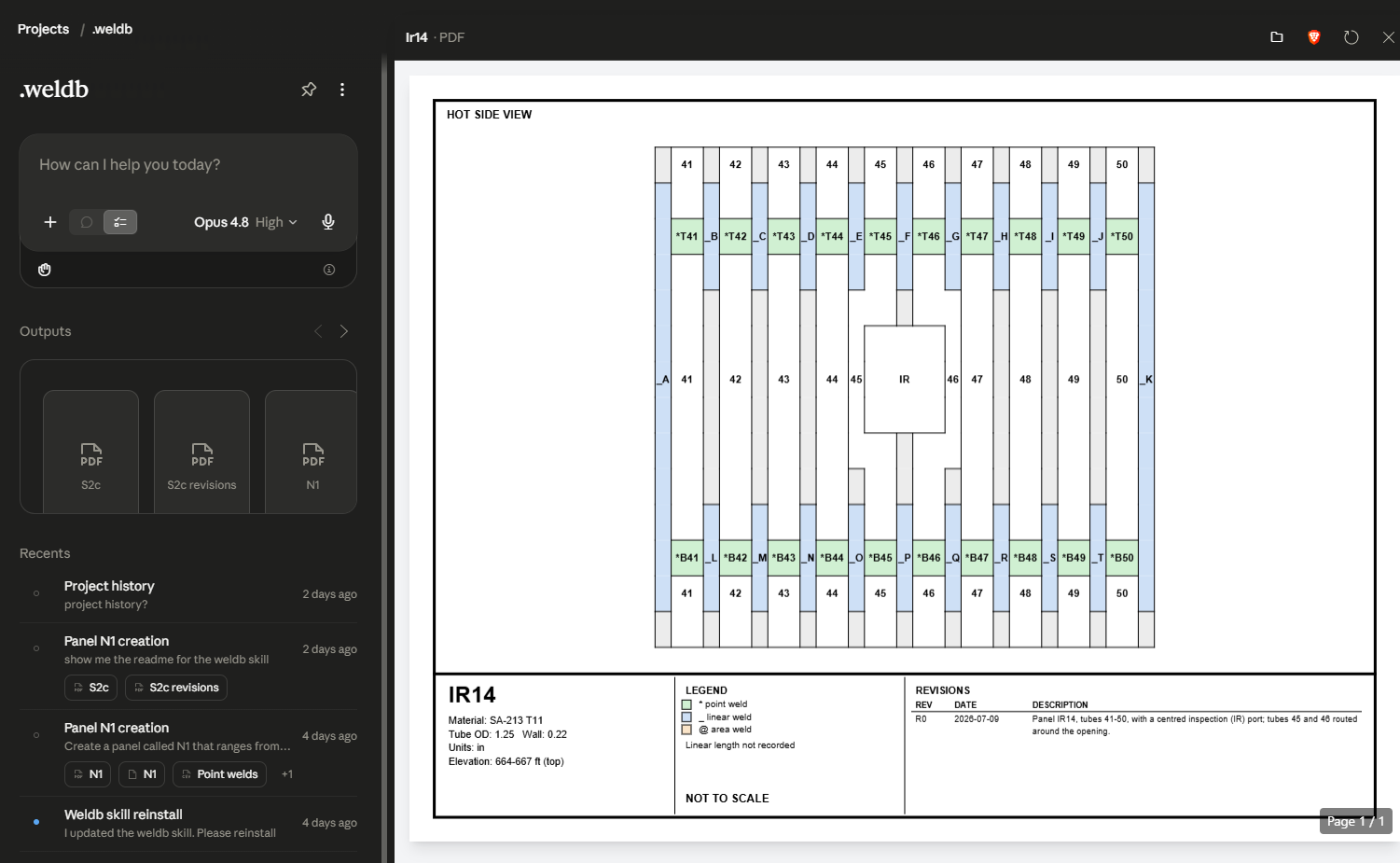
Weld Map Database: a YAML-based format for 2D weld-map drawings that double as the static weld record, built for boiler repair projects where good engineering drawings rarely exist. A single .weldb file is both the 2D weld-map drawing and the authoritative weld record for a panel. Ships as a Claude skill with a bundled Python library, CLI scripts, worked examples, and full format specs; nothing needs to be installed and no network access is required.
- One file, two jobs: panel properties, an append-only revision history, and grid-based views laying out tubes, membranes, and welds.
- Render on save, always: saving a panel re-renders its PDF drawing and rebuilds the project weld CSVs in the same step, so derived artifacts never go stale.
- Every weld type: point, linear, and area welds, plus ports, clips, dutchman repairs, cladding, dropped/offset tubes, and multi-view panels.
- 18 worked examples: copyable
.weldbarrangements from a baseline panel to stacked, overlapping, and transition-belt layouts. - Interactive HTML editor: build a self-contained artifact that renders each view as editable cells and exports updated YAML.
Install: load weldb.skill into Claude Code / Agent SDK. Optional dependency: fpdf2 (PDF rendering only).
GitHub: github.com/ProcessQualitySolutions/weldb (MIT license)
Developed by the qcdatabase.ai team. Works well with QCDatabase.AI, no membership required.
welder-lots
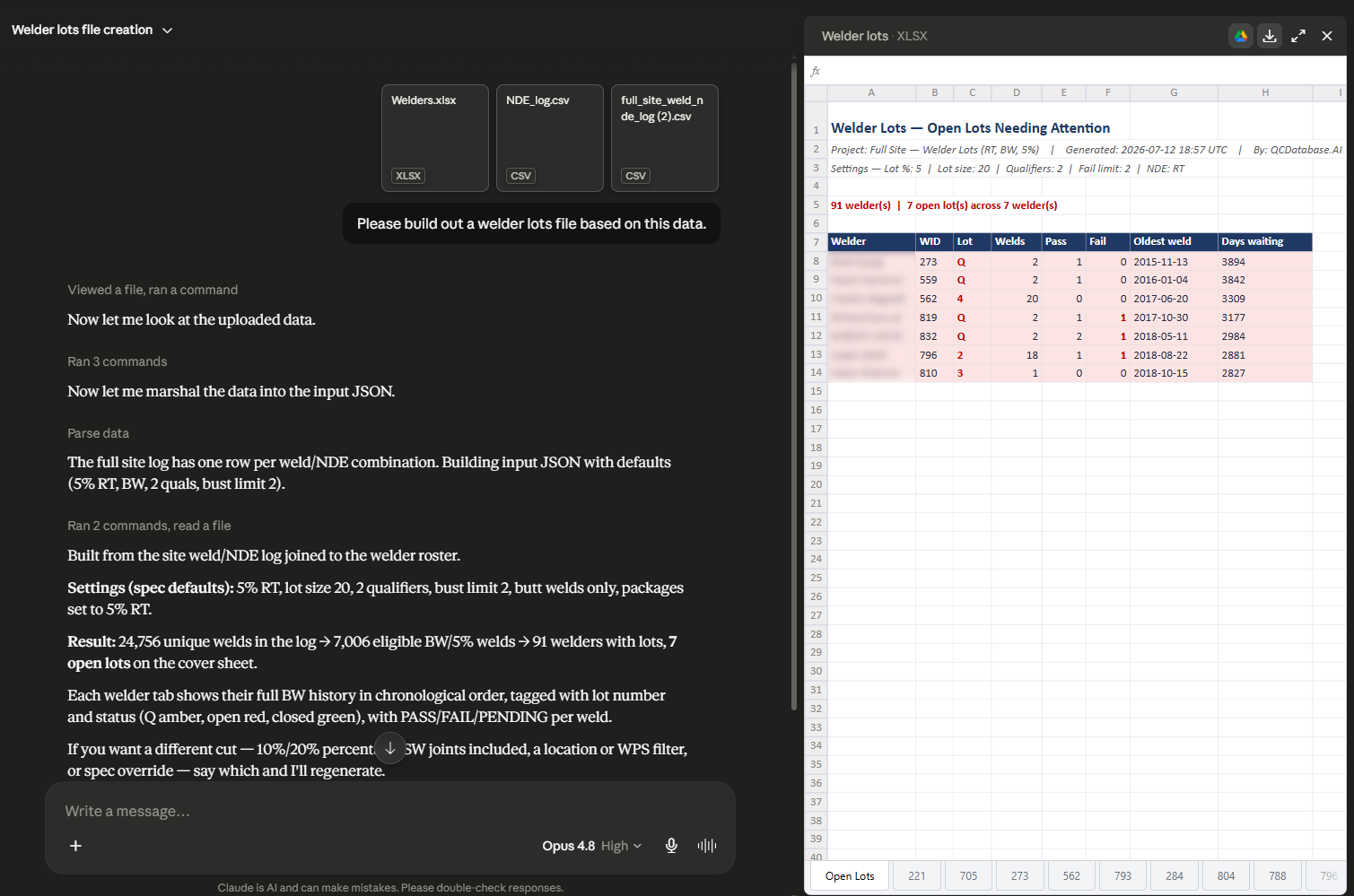
An AI-agent skill (Claude Code / Agent SDK) that groups a welder's production welds into statistical NDE lots (radiography / RT lot-acceptance per ASME B31.1 / B31.3), evaluates each lot as open or closed, and renders the deliverable: an XLSX workbook with a cover sheet of open lots plus one tab per welder. It also performs the uniform random weld draw for examination, with an audit-log line for every selection.
- Deterministic lot engine: the same welds, NDE results, and filter settings always produce the same lots and the same open/closed verdicts.
- Auditable random draw: uniform selection from an open lot's eligible pool using the OS CSPRNG (seedable for tests), logged per selection.
- Complete behavior spec included: domain model, lot grouping, qualifying lots, failure escalation, aging warnings, and filter presets.
- Source-agnostic input: weld/NDE data can come from any quality system (e.g. QCDatabase.AI via its MCP server), CSV export, or database.
Install: load welder_lots.skill into Claude Code / Agent SDK. Optional dependency: openpyxl (XLSX output only).
GitHub: github.com/ProcessQualitySolutions/welder_lots_skill (MIT license)
Developed by the qcdatabase.ai team. Works well with QCDatabase.AI, no membership required.
zipmaps
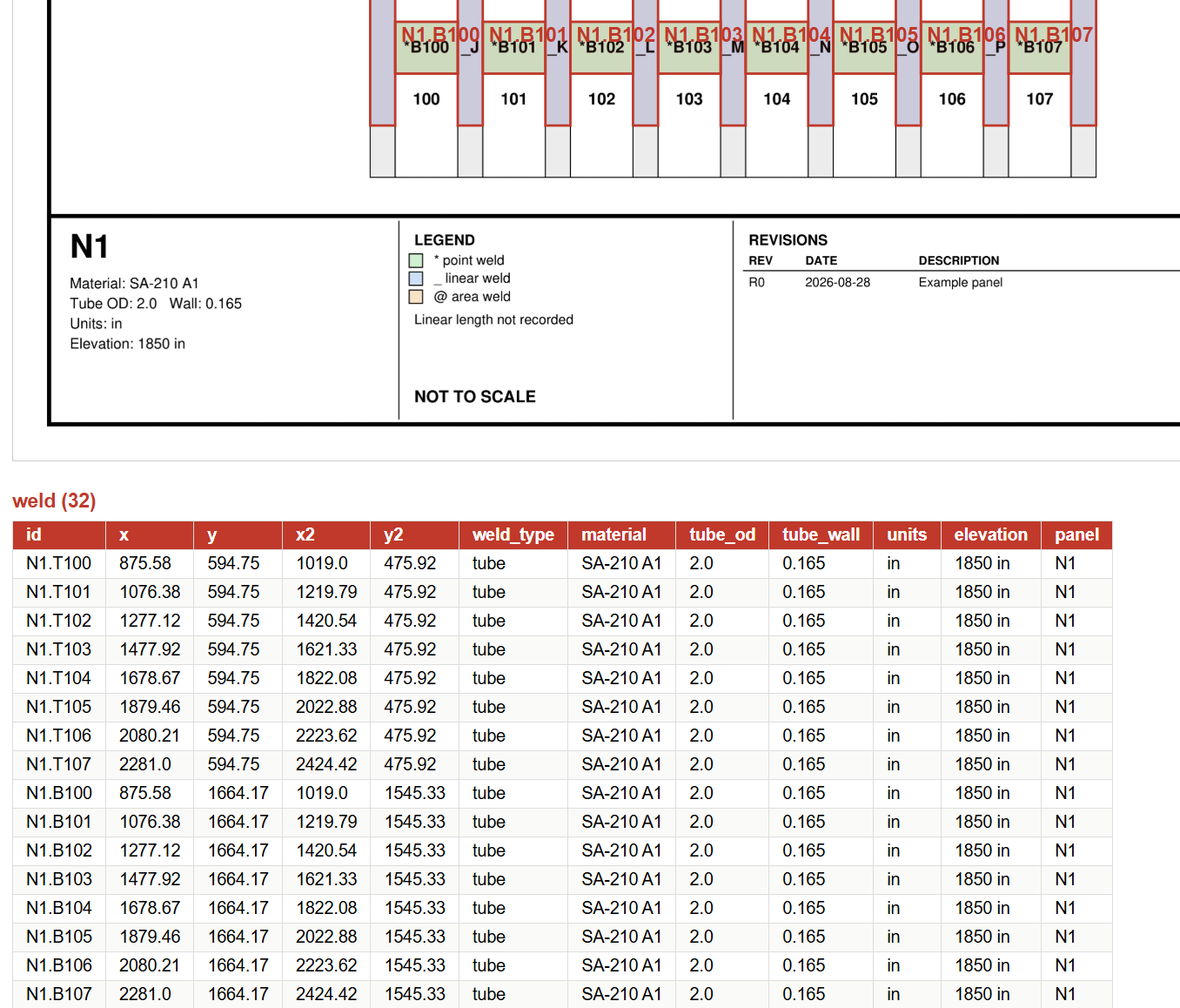
Transportable weld, flange, and heat maps stored as .zipmap files: a plain zip archive packaging one construction drawing (single-page PDF and/or PNG), JSON map-item data with x/y map points and x2/y2 flag anchors or rectangle corners, the JSON Schemas that define each item type, and optionally the drawing's extraction record (bill of materials, line number, title-block parameters). Every valid zipmap contains a PNG of the drawing, so any web reader displays it with zero conversion. The skill creates, saves, validates, converts, and renders them.
- One save pipeline, always correct: single-page check, PNG render at a chosen DPI, PDF-point to pixel coordinate conversion, bounds checking, and schema validation. The
.zipmapis written only when every check passes. - Schema-defined item types: each map-item type is a JSON Schema bundled in the archive, so welds, flanges, heat numbers, or any project-specific type validate the same way.
.zipmapttemplates ship schemas alone to standardize a project. .zipmap.jsoninterchange: flatten a map into one API-friendly document with base64 PNG for web views, base64 single-page PDF for turnover, the extraction record, and pixel-space items keyed by a server-side schema id, ready to POST. A full spec for endpoint implementers is bundled.- Zero-dependency viewing: a self-contained HTML overlay and an interactive pan/zoom viewer with layer toggles and clickable item details, both single files with no third-party packages. Paginated PDF map sheets render with fpdf2.
- Chained commands: the bundled
zm.pyrunner executes every step as a subcommand in one process (zm.py save m :: validate m :: render m), roughly 3.4x faster than running the steps as separate processes.
Install: load zipmaps.skill into Claude Code / Agent SDK. Image-only zipmaps need no third-party packages. Optional dependencies: pymupdf (PDF-backed maps), fpdf2 (PDF map sheets).
GitHub: github.com/ProcessQualitySolutions/zipmaps (MIT license)
Developed by the qcdatabase.ai team. Works well with QCDatabase.AI, no membership required.
Robots & AI agents: a machine-readable catalogue of these skills is available at /skills/index.json.